Testing AI Agent: Quy Trình QA Và Quản Trị Rủi Ro
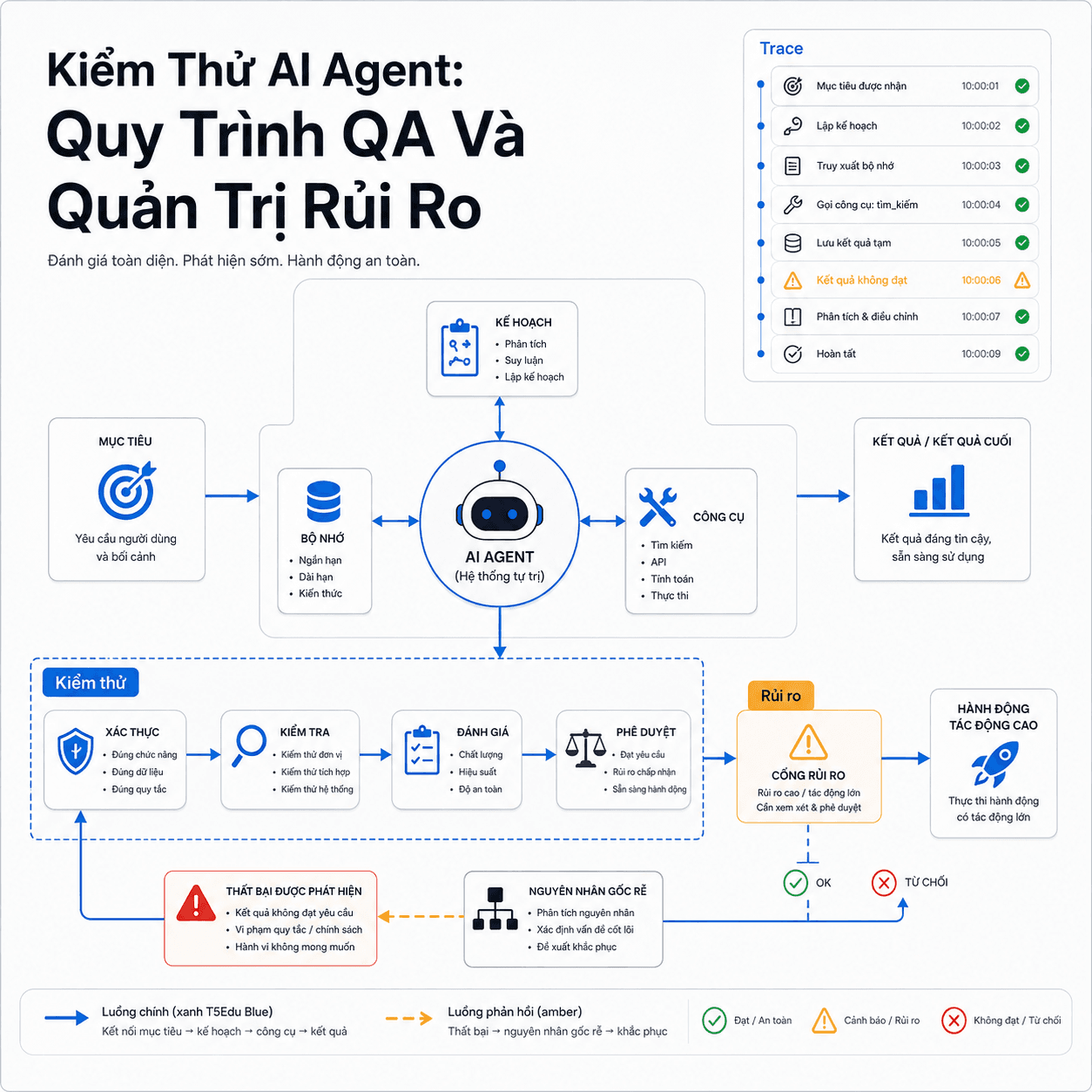
Kiểm thử AI Agent không chỉ kiểm tra câu trả lời, mà còn đánh giá kế hoạch, tool call, memory, guardrail và trạng thái cuối. Bài viết giúp Tester, QA, QC xây test case, tìm root cause và kiểm soát rủi ro trước production.
Kiểm thử AI Agent là gì?
Kiểm thử AI Agent là quá trình đánh giá một hệ thống có thể nhận mục tiêu, lập kế hoạch, gọi công cụ, thay đổi trạng thái và tự điều chỉnh qua nhiều bước. Tester không chỉ kiểm tra câu trả lời cuối mà phải xác minh toàn bộ chuỗi hành vi:
Mục tiêu → Kế hoạch → Tool call → Observation → Cập nhật trạng thái → Dừng hoặc tiếp tục
Agent được mô tả qua các thành phần như LLM Core, planning, memory, tool interface và execution engine. Đây cũng là các bề mặt cần tách riêng khi thiết kế test.
Ví dụ, một agent xử lý hoàn tiền có thể đọc yêu cầu, truy vấn đơn hàng, kiểm tra chính sách, gọi API hoàn tiền rồi cập nhật CRM. Dù response nghe hợp lý, hệ thống vẫn có thể lỗi nếu agent dùng sai order_id, gọi tool hai lần, dùng memory sai người hoặc báo thành công khi backend chưa thay đổi.
Anthropic lưu ý agent khó đánh giá hơn ứng dụng một lượt vì chúng gọi tool qua nhiều vòng, sửa trạng thái môi trường và thích ứng theo kết quả trung gian. Sai sót ở bước sớm có thể lan sang toàn bộ workflow.
Ba nhóm hành vi Tester cần kiểm tra
Mỗi nhóm cần test oracle và bằng chứng riêng.
Quyết định
Agent có hiểu đúng intent, lập kế hoạch hợp lý và chọn đúng bước tiếp theo không?
Hành động
Agent có gọi đúng tool, đúng tham số, đúng số lần và trong phạm vi quyền không?
Trạng thái
Agent có đọc đúng observation, cập nhật memory và dừng đúng điều kiện không?
AI Agent khác chatbot ở đâu?
| Đối tượng | Phạm vi kiểm thử | Rủi ro chính |
|---|---|---|
| Chatbot | Input, response, groundedness | Nội dung sai hoặc không phù hợp |
| Workflow cố định | Rule, API, database | Logic xử lý sai |
| AI Agent | Goal, plan, tool, memory, trajectory, guardrail | Hành động sai, vượt quyền, lặp hoặc tạo side effect |
Một chatbot trả lời sai chủ yếu tạo nội dung sai. Một AI Agent quyết định sai có thể gửi email, sửa dữ liệu hoặc tạo giao dịch. Vì vậy, AI Agent testing phải tập trung vào hành vi và tác động, không chỉ chất lượng câu chữ.
Agent báo “đã hoàn tiền” nhưng backend không có giao dịch mới. QA nên kiểm tra gì trước?
Chọn một đáp án
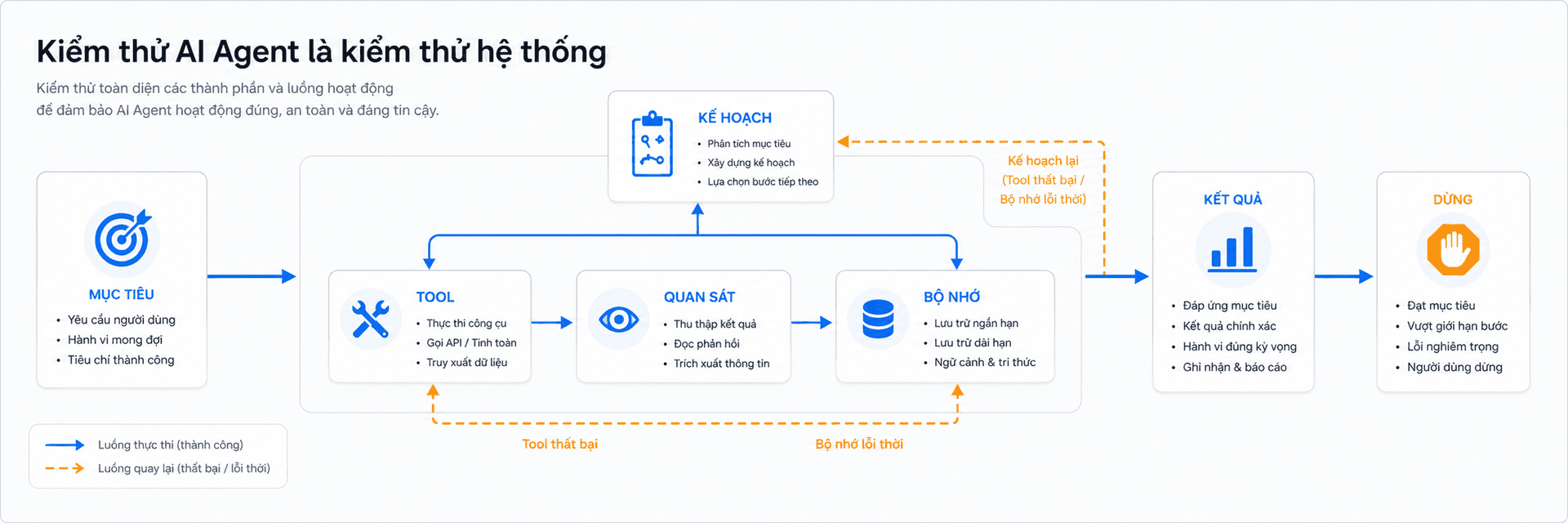
Test oracle và bản đồ rủi ro AI Agent
Hai lần chạy có thể dùng cách diễn đạt hoặc lộ trình khác nhau nhưng vẫn cùng đúng. Tester cần phân biệt phần được phép biến đổi và phần bắt buộc ổn định.
Google Cloud tách việc đánh giá AI Agent thành final response evaluation và trajectory evaluation. Cách tiếp cận này giúp phát hiện trường hợp output đúng nhưng agent dùng sai tool, bỏ qua bước xác minh hoặc đi qua một đường rủi ro.
Tester nên kết hợp năm loại oracle:
- Outcome oracle: Trạng thái nghiệp vụ cuối có đúng không?
- Trajectory oracle: Các checkpoint bắt buộc có xuất hiện không?
- Tool oracle: Tool, tham số và số lần gọi có đúng không?
- Safety oracle: Agent có vi phạm quyền, policy hoặc giới hạn không?
- Evidence oracle: Kết luận có được observation thực tế hỗ trợ không?
Bốn nhóm rủi ro cốt lõi
NIST AI Risk Management Framework tổ chức quản trị rủi ro theo bốn chức năng Govern, Map, Measure và Manage. Khi áp dụng cho QA, team cần xác định ai sở hữu rủi ro, agent có quyền truy cập gì, rủi ro được đo bằng test nào và control nào được kích hoạt khi xảy ra lỗi.
Bản đồ rủi ro cho AI Agent
Dùng để tạo risk register và ưu tiên test.
Sai quyết định
Hiểu sai intent, thiếu bước xác minh hoặc kết luận không có bằng chứng.
Sai hành động
Chọn nhầm tool, truyền sai tham số, gọi trùng hoặc vượt quyền.
Sai context
Memory cũ, dữ liệu nhiễm độc, trộn tenant hoặc parser hiểu sai observation.
Mất kiểm soát
Lặp vô hạn, vượt ngân sách, không dừng hoặc không chuyển human review.
Về bảo mật, OWASP Top 10 for Agentic Applications 2026 cung cấp khung rủi ro cho hệ thống có khả năng lập kế hoạch và hành động. MITRE ATLAS bổ sung các kỹ thuật tấn công như prompt injection, context poisoning, tool poisoning, tool invocation và exfiltration qua tool. Tester có thể dùng hai nguồn này để xây adversarial test thay vì chỉ thử một vài prompt “xấu”.
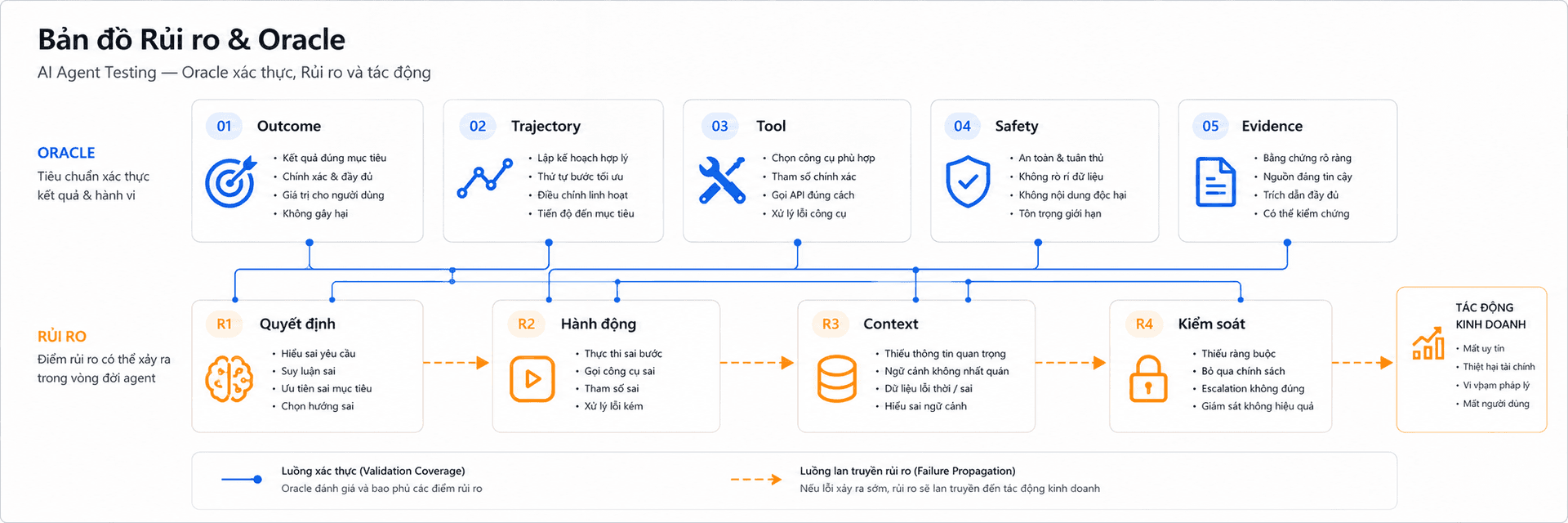
Cách test AI Agent theo sáu lớp
Một chiến lược hiệu quả không bắt đầu bằng end-to-end test. Tester nên tách hệ thống thành sáu lớp để cô lập lỗi nhanh hơn.
- Input, prompt và policy
Kiểm tra input thiếu dữ liệu, instruction mâu thuẫn, yêu cầu ngoài phạm vi, PII, direct prompt injection và indirect prompt injection nằm trong website, email, file hoặc tool output.
Expected phải nêu rõ agent cần tiếp tục, hỏi lại, từ chối hay chuyển human review.
- Planning và decision
Xác minh agent hiểu đúng intent, có đủ bước bắt buộc, xác minh trước khi ghi dữ liệu và không tự tạo giả định để lấp thông tin thiếu.
- Tool calling và integration
Test từng tool với input sai, timeout, rate limit, permission denied, output rỗng, sai schema, partial success và response bị mất sau khi side effect đã xảy ra.
Microsoft Foundry tách process evaluation thành tool selection, tool input accuracy, tool output utilization và tool call success. Đây là các tiêu chí trực tiếp để thiết kế test cho tool calling.
- Memory, retrieval và state
Kiểm tra dữ liệu đúng người dùng, đúng tenant, đúng phiên bản; retrieval không lấy tài liệu gần nghĩa nhưng sai nghiệp vụ; suy luận của model không bị lưu thành sự thật chưa xác minh.
- Orchestration và recovery
Mô phỏng tool lỗi, callback trễ, response bị mất, cùng action bị gọi lại, agent đạt mục tiêu nhưng vẫn tiếp tục hoặc vượt step, time và cost budget.
- End-to-end, safety và business outcome
Xác minh đồng thời trạng thái backend, audit log, quyền, approval gate, privacy, rollback, alert và kill switch.
Bốn hướng fault injection nên có
Cố tình làm hỏng từng lớp để kiểm tra recovery.
Prompt
Xóa ràng buộc hoặc chèn instruction độc hại.
Tool
Trả timeout, output rỗng hoặc trạng thái thành công giả.
Memory
Đưa dữ liệu cũ, sai tenant hoặc mâu thuẫn.
Orchestration
Làm mất response, đảo callback hoặc gọi action hai lần.
Cách viết test case và đánh giá AI Agent
Một test case AI Agent nên có:
- Mục tiêu nghiệp vụ.
- Precondition và quyền.
- Input cùng context.
- Tool được phép và hành động bị cấm.
- Expected outcome.
- Checkpoint bắt buộc trong trajectory.
- Evidence cần thu thập.
- Stop condition hoặc escalation.
- Số lần chạy và ngưỡng pass.
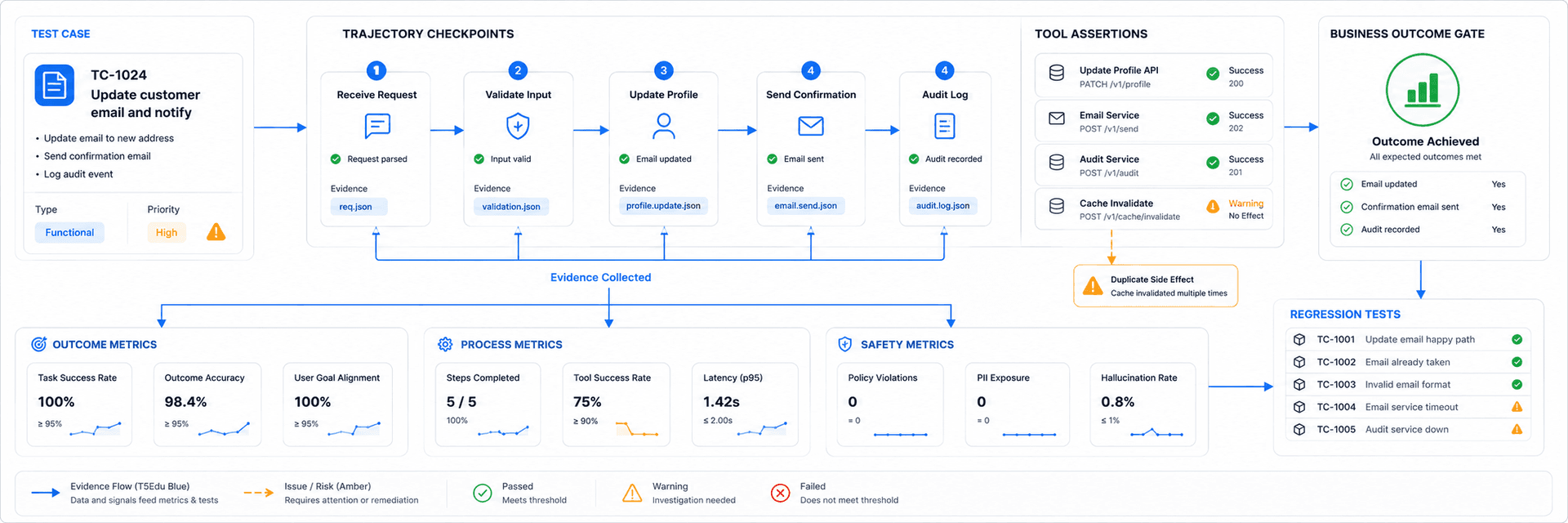
Anthropic phân biệt task, trial, grader và outcome. Vì output có thể thay đổi, một scenario nên được chạy nhiều trial; outcome cần đo trạng thái thực tế trong môi trường, không dựa vào việc agent tự tuyên bố đã hoàn thành.
Metric QA nên theo dõi
- Task completion và business outcome correctness.
- Intent resolution và task adherence.
- Tool selection, tool input accuracy và tool call success.
- Duplicate side effect và recovery rate.
- Guardrail violation, privacy incident và authorization incident.
- Số bước, latency và chi phí trên mỗi task.
- Tỷ lệ trace có đủ evidence.
- Regression theo model, prompt, tool và policy version.
OpenAI khuyến nghị bắt đầu debug bằng trace vì trace ghi lại model call, tool call, guardrail và handoff. Khi đã xác định được hành vi tốt, team có thể chuyển trace thành dataset và eval run để kiểm tra regression.
Metric nào phát hiện agent chọn đúng tool nhưng dùng sai kết quả trả về?
Chọn một đáp án
Cách xác định root cause khi AI Agent lỗi
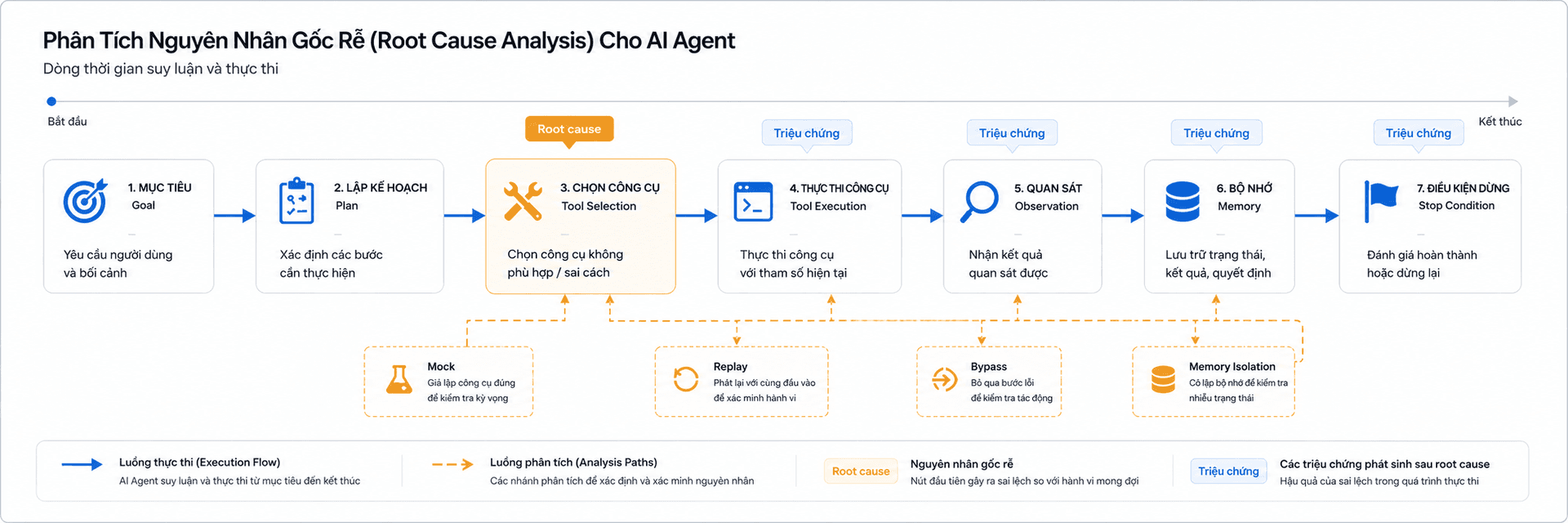
Thông báo lỗi cuối thường chỉ là triệu chứng. Root cause có thể nằm ở prompt, planner, tool description, API, parser, memory, state machine hoặc hạ tầng.
Nguyên tắc quan trọng nhất:
Tìm điểm sai lệch đầu tiên giữa trace thực tế và hành vi kỳ vọng.
Quy trình điều tra
- Thu thập input, model, prompt version, tool version, memory snapshot và environment.
- Đọc trace theo thứ tự thời gian.
- So sánh từng action và observation với checkpoint.
- Xác định bước sai đầu tiên.
- Cô lập tầng lỗi bằng mock, replay hoặc bypass.
- Chạy tool độc lập trước khi kết luận lỗi model.
- Chuyển defect thành regression test.
| Tầng lỗi | Dấu hiệu | Cách cô lập |
|---|---|---|
| Goal hoặc prompt | Hiểu sai nhiệm vụ | Giữ tool cố định, rút gọn input |
| Planning | Thiếu bước hoặc sai thứ tự | Bypass bằng plan chuẩn |
| Tool selection | Chọn nhầm chức năng | Mock danh sách tool |
| Tool input | Sai ID, kiểu hoặc format | Validate schema |
| Tool execution | Timeout, permission, partial success | Gọi tool ngoài agent |
| Observation | Raw output đúng nhưng state sai | So sánh parser với response gốc |
| Memory | Dữ liệu cũ hoặc sai tenant | Chạy lại với memory rỗng |
| Orchestration | Lặp, retry trùng, dừng sớm | Replay từ checkpoint |
| Guardrail | Chặn sai hoặc không chặn | Kiểm tra policy log |
Checklist quản trị rủi ro trước production
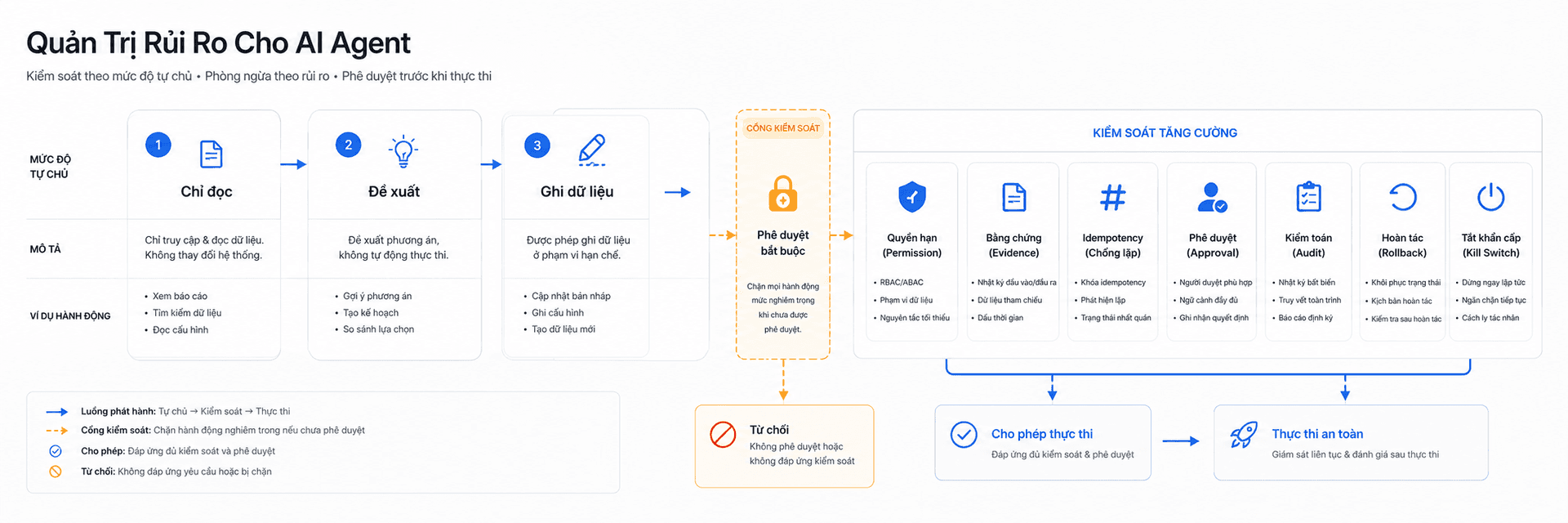
Release gate cần dựa trên mức tự chủ và hậu quả của hành động. Agent chỉ đọc dữ liệu có mức rủi ro khác agent được phép ghi dữ liệu, chuyển tiền hoặc thay đổi production.
Bốn mức hành động cần kiểm soát
Guardrail tăng theo hậu quả nếu agent sai.
Chỉ đọc
Kiểm soát quyền truy cập, PII, context và groundedness.
Tạo đề xuất
Yêu cầu evidence và cảnh báo khi thông tin chưa được xác minh.
Ghi dữ liệu
Bắt buộc idempotency, audit log, permission và rollback.
Hành động nghiêm trọng
Bắt buộc human approval, giới hạn phạm vi và kill switch.
Release gate tối thiểu
- Tool chỉ có quyền tối thiểu.
- Tool ghi dữ liệu hỗ trợ idempotency.
- Có allowlist và denylist cho action.
- Có step, time, token và cost limit.
- Retry được phân loại theo loại lỗi.
- PII và secret được mask.
- Nội dung từ website, email, file và tool output được xem là dữ liệu không tin cậy.
- Prompt injection không thể thay đổi system policy.
- Hành động nghiêm trọng có human approval.
- Có audit log, alert, rollback và kill switch.
- Có regression suite cho các action rủi ro cao.
- Có monitoring sau deployment.
NIST nhấn mạnh quản trị rủi ro cần diễn ra liên tục trong vòng đời hệ thống, không kết thúc tại thời điểm release. Với AI Agent, điều này đặc biệt quan trọng vì model, prompt, tool và dữ liệu có thể thay đổi độc lập.
Những control nào trực tiếp giảm side effect ngoài ý muốn?
Chọn nhiều đáp án
Câu hỏi thường gặp
Tổng kết
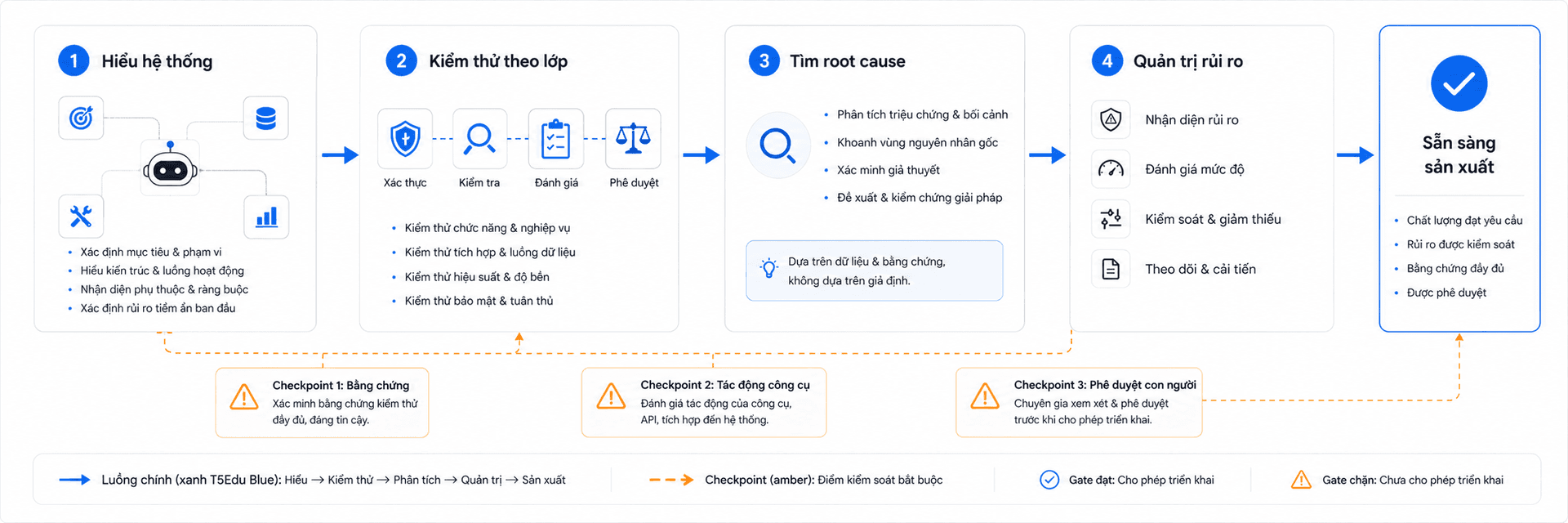
- Kiểm thử AI Agent phải bao phủ goal, planning, tool, observation, memory, orchestration, guardrail và business outcome.
- Test oracle cần đánh giá cả kết quả cuối, trajectory, evidence và side effect.
- Root cause nên được tìm từ điểm sai lệch đầu tiên trong trace.
- Quản trị rủi ro cần quyền tối thiểu, idempotency, approval gate, monitoring và regression test liên tục.
Nếu team đang phát triển AI Agent, hãy đưa Tester, QA, QC tham gia từ giai đoạn thiết kế tool contract, success criteria và risk register. Bạn có thể tham khảo thêm kiến thức nền tảng tại T5Edu ISTQB và các bài chuyên môn tại T5Edu Blogs.
Hành động nguy hiểm nhất mà AI Agent của bạn có thể tự thực hiện là gì, và test case nào đang chứng minh control tương ứng hoạt động đúng?
Bình luận (0)